Create a show/hide accordion-style element
The accordion is set to automatically open the first accordion in the accordion container.
For omniCMS, to have a closed accordion by default, make sure you add the class _collapsed to the accordion table.
For development, to have a closed accordion by default, make sure you add data-open="false" in the accordion header.
        <div class="tcu-accordion-container _questions" data-position="">
    <div class="tcu-accordion">
        <button type="button" class="tcu-accordion-header" id="item-1">
            <span></span>
            Item 1 Heading
            <span class="tcu-accordion-button-icon"></span>
        </button>
        <div class="tcu-accordion-content">

            <p>Accordion Item 1 content.</p>

        </div>
    </div>
    <div class="tcu-accordion">
        <button type="button" class="tcu-accordion-header" id="item-2">
            <span></span>
            Item 2 Heading
            <span class="tcu-accordion-button-icon"></span>
        </button>
        <div class="tcu-accordion-content">

            <p>Accordion Item 2 content.</p>

        </div>
    </div>
</div>
-
Content:
# How the accordion works This walks through what actually happens to a panel's `max-height` from the moment it opens to the moment it closes, plus the accessibility and usability behaviors layered on top — several of which exist specifically to keep collapsed content reachable via the browser's native find-in-page (Ctrl+F / Cmd+F) rather than hiding it away entirely. ## The problem the height animation works around CSS can animate between two fixed numbers (`0px` to `400px`) just fine, but not between a fixed number and an intrinsic size like `auto` or `none` — there's no way to interpolate towards "however tall the content turns out to be." Since this component's resting states are "closed = `0`" and "open = `none`," a real pixel number has to stand in for the intrinsic size just long enough to animate, then hand back control once the animation is done. That hand-off is the core mechanic behind everything below. Browsers are closing this gap — Chrome now supports animating directly to intrinsic sizes via `interpolate-size` / `calc-size()` ([details](https://developer.chrome.com/docs/css-ui/animate-to-height-auto)). Once that's broadly supported, most of this file's height-tracking machinery could likely be replaced with a plain CSS transition to `height: auto`. ## Opening, step by step **1. Get a target number to animate to.** There are two ways: - **First time this panel has ever been opened:** its height isn't known yet, so it gets measured. `measureNaturalHeight()` briefly sets `max-height: none` (so the content can size itself normally), reads `offsetHeight` to get a real pixel number, and that becomes the target. - **This panel was opened before, then closed:** a number is already saved from last time (`dataset.contentHeight`, written when it was closed — more on that below), so measuring is skipped and that saved number is reused. This is the fast path — `pinAndAnimate` handles it in one shot. **2. Animate from `0` to that target number.** A real CSS transition, `0px → 400px` for example, taking 300ms per the stylesheet. **3. Once that transition finishes, let go — `max-height` goes back to `none`.** This is what stops images and embedded apps from getting clipped. Without this step, `max-height` would stay pinned at whatever number was measured in step 1 — forever, or at least until the panel closes. If an image was still downloading, or an embedded app hadn't rendered its content yet, when step 1 measured the height, that measurement comes out too small, and since nothing ever releases the pin, the panel stays capped at that too-small number permanently. Anything that shows up later gets sliced off by `overflow: hidden`. Releasing back to `none` fixes this not by recalculating anything, but by removing the need to. Once `max-height` is `none` again, the box isn't a fixed size anymore — it's back to "auto-size to whatever content is inside," which is ordinary, continuous browser behavior. No JavaScript has to notice when an image finishes loading or when an app mounts new DOM; the browser reflows automatically, the same way any ordinary uncapped element would, whether that content shows up 10ms later or 10 seconds later. **Nothing keeps re-checking the height while a panel sits open.** Once `max-height` is `none`, the box is correctly sized at all times simply because that's what `none` means — there's nothing to keep in sync, because it's never out of sync to begin with. **How the code knows the transition in step 2 is finished, so it knows when to let go:** two signals, whichever happens first: - The browser reports it directly — a `transitionend` event fires the instant the CSS animation completes (~300ms). - A 350ms backup timer, in case `transitionend` doesn't fire for some reason (the one known case: the measured height turned out to be `0`, so there was no real size change to animate, and a transition with no change never fires `transitionend`). Whichever fires first wins, and the other is cancelled. This applies the same way regardless of how fast or slow the panel's own content loads — that's the whole point of releasing the cap instead of leaving it pinned. ## Closing, step by step The only moment a panel's height gets measured again after it opens is when it **closes**: **1. Cancel any leftover cleanup from a very recent open.** If a panel was opened moments ago and hasn't reached the "let go" step yet (only matters when closing within ~350ms of opening), that pending step is cancelled first — otherwise it could fire mid-close and cause a visible stutter. **2. Measure the panel's real, current height**, using the same `measureNaturalHeight()` used on open. Since the panel has been resting at `max-height: none` the whole time it was open, this measurement reflects however tall the content actually is right now — including anything that loaded late. There's no way for it to be stale, because nothing was capping the box in between. **3. Save that number** into `dataset.contentHeight` on the element — the number the next open reuses via the fast path, so reopening the same panel later animates straight to the correct, already-known height instead of re-measuring from scratch. **4. Animate from that real number down to `0`**, using the same two-frame "settle" technique as opening (`settleAndAnimate`) rather than the fast `pinAndAnimate` path — going from `none` to a real pixel number is a genuine change, not a no-op, so a single reflow isn't reliably enough to establish it as a real starting point; it needs an actual painted frame first. **5. Once that transition ends, clean up**: clear the inline `max-height` (so the closed state is driven by the stylesheet's `max-height: 0` rule, not a leftover inline style) and restore `hidden="until-found"` so the collapsed content is still findable via browser Ctrl+F / Cmd+F. ## The timeline app special case Separately from the height mechanics above — if the panel being opened contains the `.tcu-timeline-app` widget, the same "let go" moment (step 3 of opening) also fires a `resize` event on the page. That widget's scroll-reveal animations use a library (GSAP ScrollTrigger) that caches position data based on the page layout the moment it loads — often while the panel is still collapsed. The resize event nudges it to recalculate using the panel's real, now-open layout. `resizeOnOpenSelectors` in the code is the list of selectors that trigger this nudge, in case another embedded app needs the same treatment later. ## Usability and accessibility behaviors The height animation is one piece of a larger set of behaviors this component handles: - **Deep-linking.** Every panel's heading has an id, and the accordion opens the matching panel automatically if the page loads with that id in the URL hash (`#accXXX-...`). Clicking a heading also updates the URL hash via `history.replaceState`, so the current panel can be bookmarked, shared, or linked to directly — closing a panel removes the hash again. A `hashchange` listener keeps this in sync if the hash changes without a full page reload. - **Keyboard and screen reader support.** Headings get `aria-expanded` (`true`/`false`) so assistive technology announces open/closed state, and the content panel gets `aria-hidden` in step with it. The little icon next to each heading has its own `aria-label` ("Open Accordion" / "Close Accordion") that updates as the panel toggles. - **Browser find-in-page (Ctrl+F / Cmd+F).** Closed panels use `hidden="until-found"` instead of `display:none`, which keeps their text searchable by the browser's native find feature. If a search match lands inside a closed panel, the browser's `beforematch` event opens that panel automatically before scrolling to the match, so the found text is actually visible. - **Print.** Printing a page temporarily removes `hidden="until-found"` from every panel regardless of its open/closed state, so a printed copy shows all the content, not just whatever happened to be open on screen — then restores the collapsed state afterward for anyone still viewing on screen. - **Window resize.** Resizing the viewport clears any cached heights and removes the pixel cap from whatever panel is currently open, so a significant layout change (like rotating a device, or a responsive breakpoint shifting) can't leave a panel capped at a now-incorrect height. - **Backward compatibility.** Older accordion markup that predates the current heading structure gets automatically upgraded in place (`updateHeading`) so existing content on older pages doesn't break when the component itself is updated. - **Only one panel open per container.** Opening a panel closes any other panel that's currently open in the same accordion group, keeping the interaction pattern predictable — one topic expanded at a time. - URL: /components/raw/accordion/accordion-behavior.md
- Filesystem Path: _src/components/common/accordion/accordion-behavior.md
- Size: 8.9 KB
-
Content:
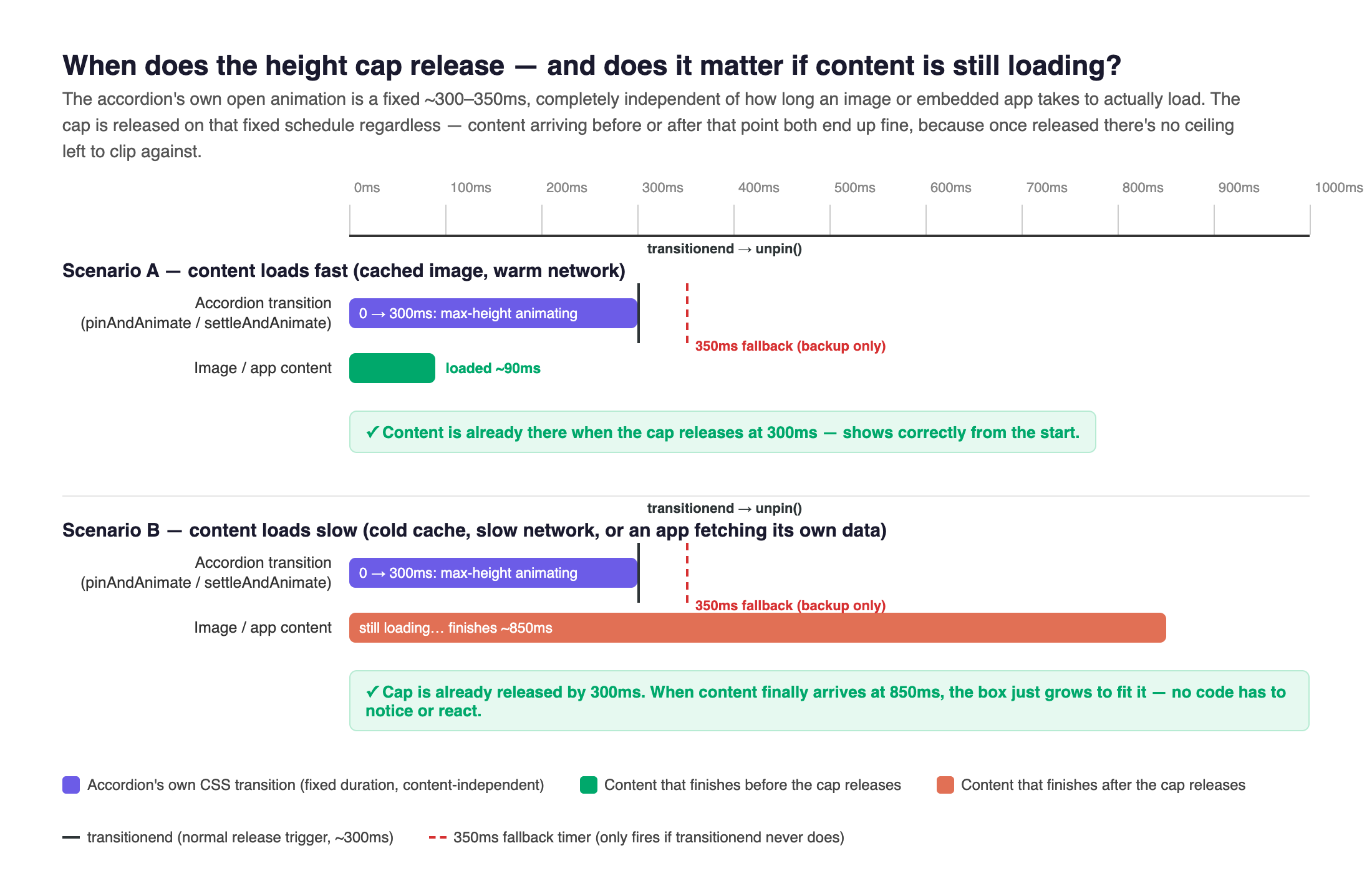
- URL: /components/raw/accordion/accordion-content-timing.png
- Filesystem Path: _src/components/common/accordion/accordion-content-timing.png
- Size: 245.9 KB